Who Owns Your Website? Domain, Hosting, and Code Explained
By Egor · · 9 min read
Short answer: probably some of it, and almost never all three pieces. Which ones you hold decides how easily you can walk away — and the piece that matters most is the domain.
Most business owners work out which pieces they hold at the worst possible moment: when they want to leave.
The confusion is understandable, because “my website” sounds like one object. It isn’t. It’s three separate things that can each belong to a different party, and plenty of small businesses own one of them without owning the other two. You can pay for a site for five years and still not be able to take it anywhere.
Here’s what the three pieces are, how to check which ones are yours, and what to do if the answer isn’t what you hoped.

The three parts
Your domain is your address: yourbusiness.com. It’s rented from a registrar, usually for $10–$20 a year, and whoever’s name is on that registration controls it. This is the piece that matters most, and I’ll explain why in a moment.
Your hosting is where the files live so people can reach them. Think of it as the plot the building sits on. Common providers are Vercel, Netlify, SiteGround, or the hosting built into a platform like Wix.
Your code is the website itself: the design, the pages, the functionality. On a builder, there is no code you can take, because the site only exists inside that platform. On a custom-built site, the code sits in a repository and can move anywhere.
There’s a fourth piece people forget until it bites: your email. If info@yourbusiness.com runs off your domain, then losing the domain also means losing every email address attached to it.
Why the domain matters most
If you own the domain and nothing else, you’re fine. Annoyed, maybe, and facing a rebuild, but fine. Your customers can still find you, your printed cards still work, the reviews and rankings you’ve built up over the years still point at you.
If you own everything except the domain, you’re in real trouble. Your address belongs to someone else. Every review that links to your site, every ranking you’ve accumulated in Google, every menu someone bookmarked, every flyer with your URL on it: all of it points at a thing you don’t control.
I looked at a Caribbean café recently whose entire web presence lives on a subdomain of the platform that provides their payment terminals. Their address ends in the platform’s name, not their own. If they ever switch payment providers, they don’t take the site with them. They start over. (I wrote about that site and two others in the piece on cheap websites.)
The domain is the name of your business as it exists online. It should be in your name, on day one, without exception.
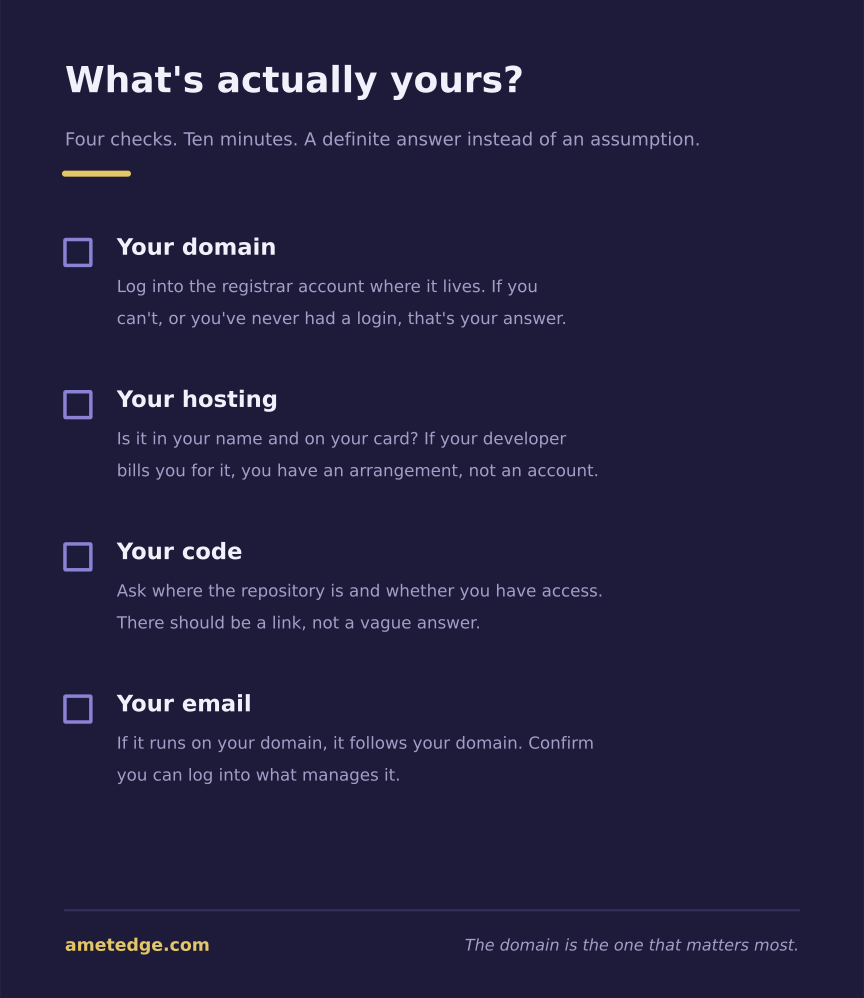
How to check, in about ten minutes
The domain. Go to any WHOIS lookup service and enter your address. Privacy protection now hides most registrant names, so you may see a proxy service instead of anyone real. If so, do this instead: log into the registrar account where the domain lives. If you can log in yourself and see the domain, it’s under your control. If you don’t know which registrar it is, or you’ve never had a login, that’s your answer.
The hosting. Same test. Can you log into the hosting account? Is it in your name and on your card? If your developer pays for hosting and bills you for it, you don’t have an account, you have an arrangement.
The code. Ask a direct question: “Where is the repository, and do I have access to it?” On a custom-built site there’s a real answer, usually a GitHub or GitLab link. On a builder, the honest answer is that there’s nothing portable to hand over, which is a legitimate trade-off, but you should know you’ve made it.
The email. If your business email runs on your domain, it follows the domain. Confirm you can log into the account that manages it.
The 60-day trap
This is the part that turns a small problem into a two-month one, and almost nobody knows about it until they’re stuck.
ICANN’s Transfer Policy lets a registrar block a transfer for 60 days after a domain is first registered or after it moves between registrars, and requires a mandatory 60-day lock after a Change of Registrant, the formal name for putting a domain in someone else’s name. The first two aren’t something you can ask to have waived. The third has an opt-out, but only if you register it before the change, which is exactly the kind of detail you find out about afterward.
In practice: if your developer registered the domain in their own name and you now want it moved to yours, that’s a Change of Registrant, and it starts the clock.
In March 2025, ICANN’s GNSO Council adopted a package of reforms that scraps the Change of Registrant lock entirely and shortens the other two from 60 days to 30. Implementation is still underway, and as of August 2026 the original 60-day locks are all still in force. (ICANN Transfer Policy, checked August 2026.)
The lesson is simple. Getting the registration right at the start costs nothing. Fixing it later costs you two months of not being able to move.
Warning signs
None of these mean someone is cheating you. Some are ordinary conveniences that happen to leave you exposed. But each one is worth a direct question.
- You’ve never seen a login for your domain or hosting
- Your developer “handles all that” and bills you a single combined fee
- Your site address is a subdomain of a platform:
yourbusiness.squarespace.com,yourbusiness.square.site - The proposal or contract doesn’t mention ownership at all
- You’re told the site can’t be moved, or that it “only works on our system”
- You ask for the code and get a vague answer instead of a link
The single most useful thing you can do is ask, in writing, before you sign: if I stop working with you, what do I take with me? A straight answer takes one sentence. It’s one of nine questions worth asking before you hire.
How I handle it
I’ll describe my own setup, partly because this article would be hollow without it and partly because there’s one detail in it that deserves scrutiny rather than a sales pitch.
The domain is always registered in your name. Not mine, not my company’s. I insist on this even when a client would rather I just take care of it, because the domain is the name of your business and it has to belong to you. This isn’t negotiable on my end.
You always get the code. Whether or not you take a support plan, the repository is yours. That’s true from the first day, not from the day you leave.
If you take no support plan, you also get hosting with the domain already connected, written instructions for paying the domain and hosting renewals yourself, and help setting up a business email on your domain, like info@yourbusiness.com. You run it from there.
If you take a support plan, there are two ways to set it up:
- Everything sits on your own accounts, and I’m added as an admin or developer.
- Everything is still registered to you, but the site is deployed on my hosting account so you never have to learn how hosting works. If support ends, I migrate the project and the DNS over to you. The domain doesn’t need moving, because it was never in my name.
The second option is the one you should look at hard, because it’s the same shape as the arrangement I just told you to be careful of. Here’s the honest version of why I think it’s different, and you can decide whether you agree.
The test I’d apply to any developer is this: if they vanished tomorrow, could you rebuild without them? Under option 2 you hold the domain, which is the part nobody can take from you, and you already have the code, which means any competent developer can redeploy it elsewhere: an afternoon for a simple site, a couple of days if there’s a database and payment integrations behind it, plus up to 48 hours for DNS changes to propagate, which nobody can speed up. What you’re handing me is a deployment account, not your business. If I disappear, you lose a login you never used and keep everything that matters.
If that reasoning doesn’t satisfy you, take option 1. Both are on the table, and I’d rather you picked the one you can sleep on.
The full pricing breakdown is here if you want to see how this fits with what things cost.
How to transfer your website to a new developer
Say you’ve checked and the domain is in your developer’s name, and you’d rather it wasn’t. Don’t panic, and don’t lead with an accusation. Most of the time this happened because it was faster at setup, not because anyone planned to hold anything hostage.
- Ask plainly. “I’d like the domain moved into my name. Can you start that?” Most developers will just do it.
- Ask about the opt-out before any registrant change is made, since that’s the only moment it’s available.
- Get your own registrar account first, so there’s somewhere for the domain to land.
- If you get resistance, remember that you have leverage: your content, your reviews, and your ability to rebuild elsewhere. A domain is worth less to them than the reference you’re not going to give.
- Whatever happens, get the code and a backup, so a rebuild is a rebuild and not a start-from-nothing.
Do I own my website?
Probably parts of it. The domain, the hosting, and the code are three separate things, and it’s common to own some and not others. The checks above take about ten minutes and give you a definite answer instead of an assumption.
Can I take my website with me if I leave my developer?
You can take whatever you own. If the domain is in your name and you have the code, yes. If the site was built on a platform, you can take your domain and content, but not the site itself, since it only exists inside that platform.
Who should the domain be registered to?
You, or your business entity. Your developer can manage it, configure it, and renew it on your behalf. The name on the registration should still be yours.
What if my developer disappeared and I can’t reach them?
Start with the registrar. If you can prove the business is yours, most registrars have a dispute process, though it’s slow. If you can’t identify the registrar, a WHOIS lookup on your domain will at least tell you which company to contact. There’s a full, step-by-step recovery plan for exactly this situation if it’s already happening to you.
Is it bad if my developer hosts my site on their account?
Not automatically. Ask two questions: is the domain in my name, and do I have the code? If both answers are yes, a shared hosting arrangement is a convenience. If either is no, you’re renting your own business address.
The checklists, in one PDF. All four one-pagers from this series — is the quote fair, the ten-minute site check, what you actually own, and nine questions before you hire. Open the PDF →
Written by Egor, founder and developer at AmetEdge. I build custom websites for small businesses across the US: restaurants and cafés, auto repair and body shops, contractors and home services, dental and medical clinics, salons and studios, gyms and trainers, and plenty of others. No agency, no upfront payment, and you own everything at the end.