My Web Designer Disappeared. How to Recover Your Site
By Egor · · 10 min read
Three unanswered emails, a phone number that goes to voicemail, and a website you can’t touch. It’s a horrible position to be in, and the instinct is to start firing off angry messages.
Do one thing first instead. Look up when your domain expires. Everything else on this list can wait a week; that one can’t.
What follows is the order I’d work through it in. Most of it you can do yourself in an afternoon.

Step 1: Check the expiry date
Go to any WHOIS lookup service and enter your domain. You’re looking for one field: the expiry date.
If it’s months away, good, you have time. If it’s within the next few weeks, skip ahead to If the expiry date is close and do those two things today.
While you’re there, note the registrar name. That’s the company the domain is rented from, and it’s who you’ll be dealing with in step 5. Privacy protection hides most owner names now, so don’t expect the WHOIS record itself to tell you who controls it.
What actually happens if a domain expires
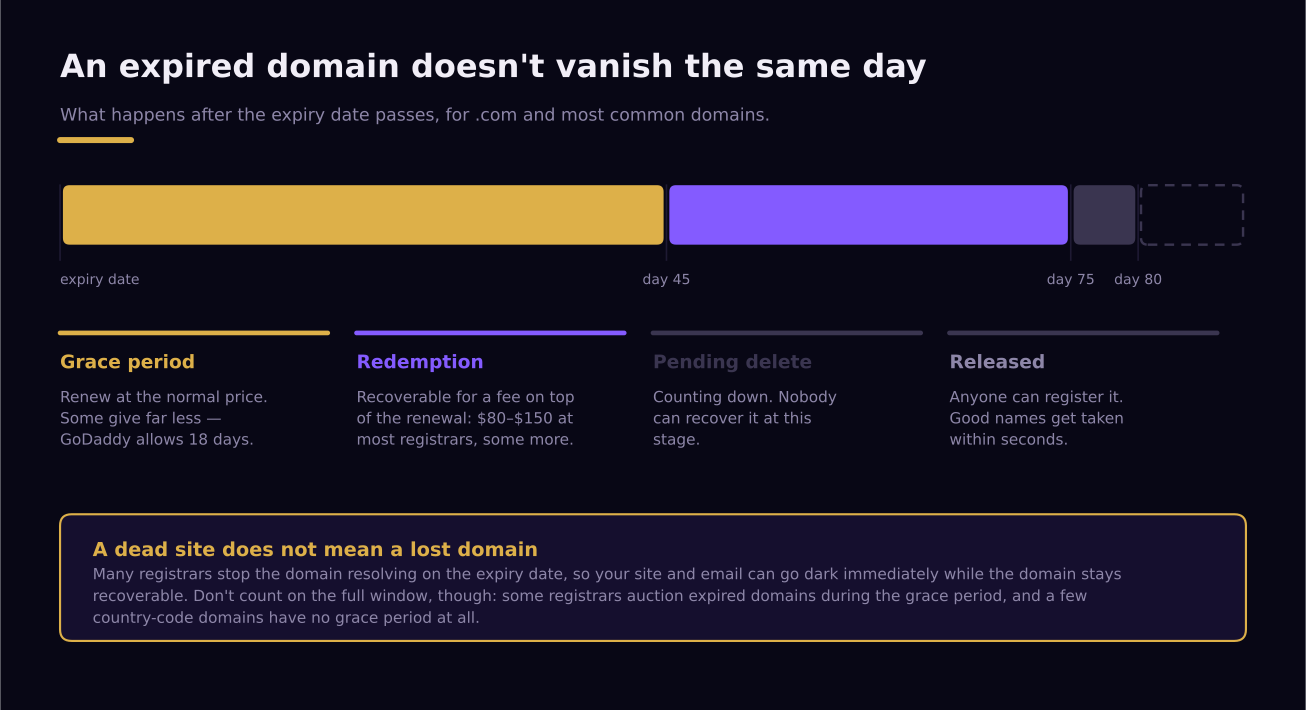
Less dramatic than most people fear, and slower. For .com and similar domains there’s a sequence:
- A grace period, up to about 45 days, though registrars set their own and some are far shorter. GoDaddy allows 18 days. During this window you renew at the normal price.
- A 30-day redemption period. Still recoverable, but with a restore fee on top of the renewal. As of early 2026 that’s $80 at GoDaddy, around $100 at most others, and $130–$150 at a few.
- Five days of “pending delete.” Not recoverable by anyone, just counting down.
- Then it’s released, and automated services often register desirable names within seconds.
So you typically have two months rather than none. One catch that surprises people: many registrars stop the domain resolving on the expiry date itself, so your website and email can go dark immediately even though the domain is still perfectly recoverable. A dead site does not mean a lost domain.
Two things that can shorten all of this. Some registrars auction expired domains during the grace period rather than waiting, so the full window isn’t guaranteed. And country-code domains like .co.uk follow their registry’s rules instead, with some offering no grace period at all. Check yours if it isn’t a .com.
If the expiry date is close
Two things, today, in this order.
Call the registrar. Not email. Explain that you’re the business the domain belongs to, that you’ve lost contact with the person who manages it, and ask whether they’ll accept a renewal payment from you without account access. Renewals are ordinary revenue for a registrar, so this is a far easier ask than a transfer or a dispute, and some will simply take the payment.
Send your developer one message about one thing. Not a list of grievances. Something close to: “My domain expires on [date]. Please renew it, or send me the login so I can. Nothing else is needed right now.” People who have been ignoring a long list of demands will sometimes act on a single small one.
Step 2: Save everything that’s still online
Your site is presumably still up. That’s an asset with a shelf life, so copy it while you can.
Go through every page and save the text into a document: your services, your descriptions, your About page, your FAQ. Save every photo. Screenshot the layout of each page on both desktop and phone.
This takes an hour and it’s the difference between a rebuild and a rebuild from nothing. If the worst happens and the site goes offline before you sort things out, this file is the only version of your content that exists.
If the site has already gone down, try the Internet Archive’s Wayback Machine at web.archive.org. It won’t have everything, and images are often missing, but it frequently has your text.
Step 3: Work out what you can still log into
Three things, three answers. Write them down honestly.
Domain. Can you log into the registrar from step 1? Search your email for their name; a receipt or renewal notice from years ago will tell you whether an account was ever created for you.
Hosting. Same test. Search your email for anything from a hosting company.
Code. Do you have a GitHub or GitLab invitation somewhere in your inbox? On a builder like Wix or Squarespace there’s no separate code to find, so the platform login is the whole answer.
Search your email properly rather than from memory. People are often surprised to find they were sent credentials at launch and filed them without reading. The full explanation of these three pieces is here if you want to understand what each one does.
Step 4: Send one more message, written differently
Before escalating, try once more, and change the tone rather than the volume.
Developers go quiet for ordinary reasons: illness, a family crisis, burnout, a job that took over. Some are avoiding you because they’re embarrassed about how far behind they’ve fallen, and an angry email makes that worse rather than better.
What tends to work is a short message that asks for one small, specific thing and gives a deadline:
Hi [name], I understand things may be busy. I’m not asking you to do any work. I just need the login details for the domain and hosting so I can take it from here. Could you send those by Friday? If it’s easier, I can call.
Keep it to a few lines. No accusations, no threats, one clear request. A surprising number of these get answered within a day, and it costs you nothing to find out.
Send it by email even if you’ve been messaging on WhatsApp, because you may want a written record later.
Step 5: Recover the domain
If there’s still no reply, contact the registrar directly.
Most have a process for exactly this. You’ll be asked to prove the domain belongs to your business, typically with business registration documents, invoices showing you paid for the domain, and evidence that the site has been operating as your business. It’s slow, sometimes weeks, and it’s the most likely of the three to succeed if you have paperwork.
Two things to know going in.
Your paperwork matters more than your story. Every invoice you paid, every email where the domain was discussed, every receipt: gather it before you make contact.
There’s a waiting period after any change. ICANN’s Transfer Policy requires a 60-day lock after a Change of Registrant, which is the formal name for moving a domain into someone else’s name. So even a successful recovery doesn’t mean you can move the domain elsewhere immediately. This lock is being phased out under reforms adopted in 2025, but it’s still in force as of publication. Plan around it rather than being surprised by it.
An uncomfortable truth worth stating: if the domain was registered in your developer’s name and nothing in writing says it’s yours, your position is weaker than it feels. Registrars are arbitrating between two claims, not enforcing what’s fair. This is exactly why the domain should be in your name from day one.
Step 6: Recover hosting and code
Hosting is usually easier than the domain, because it matters less. If the recovery drags on, the practical move is often to stop chasing it and set up your own hosting account instead. Hosting is cheap and replaceable in a way a domain is not.
Code depends entirely on what your site is built with. If it’s a custom-built site and you can’t reach the repository, you may not be able to recover the source at all. What you can recover is the front end: a developer can pull down the pages your visitors see and rebuild from those. It’s not the same as having the original, but it’s a long way from starting blank.
If the site is on Wix, Squarespace, or a similar platform, there’s no code to recover in the usual sense. What you need is the account, and the platform’s own support team is the route to it. These builders come with their own trade-offs worth knowing — here’s what I found auditing sites built on them.
What if none of it works?
Sometimes you don’t get the domain back. It happens, and it’s worth knowing what the actual damage is rather than imagining the worst.
You lose the address, which means you lose the search rankings attached to it, links from directories and review sites, and anyone who bookmarked you. That’s real and it stings.
You don’t lose your business, your customers, your reviews on Google or Yelp, your phone number, or your reputation. A new domain plus the content you saved in step 2 gets you back to a working site in a couple of weeks — and a fresh build costs less than most people expect. Six months later, most of the ranking is usually rebuilt.
The people who suffer worst are the ones who spend four months fighting for a domain instead of spending three weeks rebuilding. There’s a point where the fight costs more than the loss, and it’s usually earlier than it feels.
How I help with this
I build sites from scratch, so I’m not primarily in the recovery business. But if you’re in this situation, my first instinct is to reduce what you have to spend, not to sell you a new site.
What I’d do: try to track down the code repository, the hosting access, and the domain access, and get you back in control of what already exists. This gets much easier if you already have the repository, so if you have any GitHub or GitLab invitation in your inbox, that’s the first thing to send me.
This is billed at $40/hour, and in most cases it works out several times cheaper than commissioning a new site. For comparison, the ad-hoc rate for this kind of work in the US usually runs $50–$150/hour. If it turns out the site genuinely can’t be recovered, I’ll say so rather than keep billing, and then we can talk about building something new that’s structured so this can’t happen again: domain in your name, code in your hands from launch, every login yours.
The questions worth asking before you hire the next person are here, and the sixth one is the one that matters most for this.
Making sure it can’t happen again
Whatever you end up doing, set these up once and you never have this problem twice.
- Register the domain yourself, in your own name, on your own card. Let your developer configure it. The account stays yours.
- Keep the renewal on a card that works and turn on auto-renew. Most domain disasters are expiry, not theft.
- Ask for logins at launch, not when something goes wrong. A good developer sends them without being asked.
- Keep a folder with your registrar, hosting, and repository details, and put a copy somewhere your business partner or bookkeeper can reach.
- Save your own content once a year. It takes twenty minutes and it makes every future problem smaller.
And if you’d rather someone kept an eye on the renewals, the hosting, and the site itself month to month, that’s exactly what a support plan is supposed to cover — as long as you know which version you’re being sold.
My web designer won’t respond. What’s the first thing to do?
Look up your domain’s expiry date on a WHOIS service. If it’s close, that’s an emergency and everything else waits. If it isn’t, save a copy of your website’s content and photos before doing anything else.
Can I get my domain back if it’s in my developer’s name?
Often, though not always, and not quickly. Registrars have dispute processes that ask you to prove the domain belongs to your business. Gather your invoices and any written record of the arrangement before you contact them, because paperwork decides these more than fairness does.
How do I move my website to a new developer if the old one won’t respond?
You need three things: access to the domain, access to the hosting, and the code. Give a new developer whichever of those you have, and they can tell you quickly what’s recoverable and what has to be rebuilt. Never hand over a login you can’t also change afterwards.
How long does recovering a domain take?
Weeks rather than days. There’s also a 60-day lock after ownership changes hands before the domain can be moved to a different registrar, which is being phased out under reforms adopted in 2025 but still applies as of publication. Start the process early and keep running your business in the meantime.
Should I just build a new site instead?
Sometimes, yes. If the domain is safely yours and only the code is missing, rebuilding is straightforward. If the domain is gone and the fight has dragged on for months, a new domain and a fresh start often costs less than continuing.
The checklists, in one PDF. All four one-pagers from this series — is the quote fair, the ten-minute site check, what you actually own, and nine questions before you hire. Open the PDF →
Written by Egor, founder and developer at AmetEdge. I build custom websites for small businesses across the US: restaurants and cafés, auto repair and body shops, contractors and home services, dental and medical clinics, salons and studios, gyms and trainers, and plenty of others. No agency, no upfront payment, and you own everything at the end.