Why Cheap $500 Websites Cost More in the Long Run
By Egor · · 9 min read
The problem with a cheap website usually isn’t the price. It’s that almost nobody finishes them.
I spent an afternoon looking at real small business websites built on the cheapest available platforms. A couple of restaurants and an auto shop. Not to mock anyone, and I’m not naming them here. I wanted to know what actually goes wrong, because I kept reading articles that said cheap sites are slow and that turned out to be only sometimes true.
What I found was more interesting than slowness, and more expensive.

What I actually found
Three sites, three different platforms, three different price points at the bottom of the market.
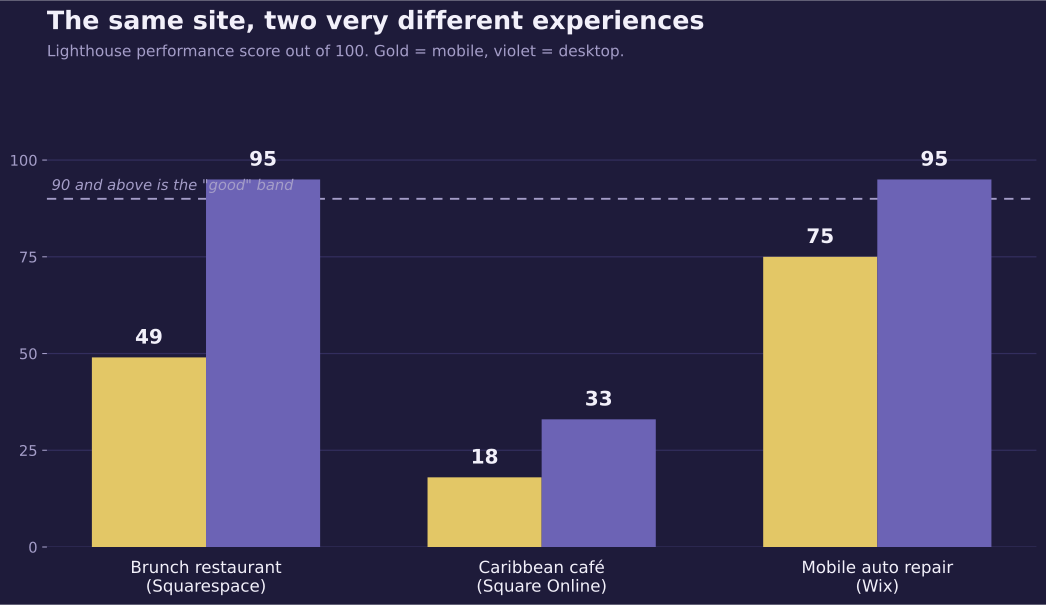
The brunch restaurant. Built on Squarespace this spring, so it’s new. It scores 49 out of 100 for speed on mobile and 95 on desktop. The owner opens it on a laptop, sees it load instantly, and has no reason to think anything’s wrong. In a throttled test simulating a mid-range Android, the first photo of the food took twelve seconds to appear.
Then there are the social media icons in the footer. They link to Squarespace’s own Instagram and Facebook accounts. Those are the template’s placeholder links, and nobody replaced them. Every customer who clicks “follow us” is sent to a website builder company in New York.
Some of the food photography is stock imagery from Unsplash, sitting next to real photos of their actual dishes. The meta description, the sentence Google shows under your link in search results, is empty.
The Caribbean café. This one runs on Square Online, the free website builder bundled with Square’s payment terminals. Speed score of 18 on mobile, 33 on desktop. Slow on every device, which at least is honest.
The bigger problem is the address, and it’s the one free website builders tend to leave you with. Their website lives on a subdomain of the platform, not on a domain they own. Everything they build there — every review link, every menu someone bookmarks, every bit of search ranking they accumulate — is attached to an address that belongs to Square. If they ever leave, they leave it all behind.
The mobile auto repair shop. This is the one that changed how I think about cheap websites. Built on Wix. It scores 75 on mobile and 95 on desktop, which is fine. Not great, but nowhere near broken.
And yet:
- The page title, the blue link text Google builds its search result from, reads “HOME | My Site 6.” That’s the default name Wix assigns a new project. Search for this business and that’s roughly what you’ll see.
- All three social icons link to Wix Studio’s accounts. Not two. Three.
- The footer says “© 2035 by Prime.” A year that hasn’t happened, and a company name that isn’t theirs. Both straight from the template.
- Two service photos are AI-generated. You can tell from the filenames, which still begin with
Gemini_Generated_Image. So a repair shop that lives or dies on trust is showing customers workshops that don’t exist instead of its own work. - There are spelling errors in the service list.
- The site lists a street address, even though the entire business model is that they drive to you.
None of that is a speed problem. The site is reasonably fast. It’s just unfinished.
A note on the numbers: these are Lighthouse lab scores, which run each site against a simulated mid-range phone on a throttled connection. Google also publishes field data from real visitors, but small business sites rarely get enough traffic to produce any, so a lab test is usually all there is to work with.
The pattern nobody mentions
Two of those three sites had social media icons pointing at the platform’s own accounts. I’ve since seen the same thing on a fourth site built with a different builder entirely.
Those owners aren’t careless. This is what happens when a website gets set up in an afternoon by someone who has a business to run. The template arrives with everything filled in — a company name, a copyright year, social links, placeholder text — and the setup process never forces you to look at any of it. You change the photos and the phone number, you hit publish, and the rest stays exactly as it shipped.
Nobody tells you that the leftovers are visible. They’re in your footer, your browser tab, your search listing.
What makes a cheap website expensive is that nobody was ever responsible for finishing it — or, later, for maintaining it.
What that actually costs
Customers who leave before they arrive. Twelve seconds is an eternity on a phone. Most people don’t wait, and they don’t tell you they didn’t wait.
Search results that don’t say your name. A page titled “My Site 6” is a wasted listing. Google generally builds its blue link from your title tag, so the one line you get in front of a searcher is spent on a placeholder.
Trust, in small deductions. A copyright date from 2035. A misspelled service. AI-generated photos of a workshop that isn’t yours. Individually, none of these lose you a customer. Together they tell a visitor that nobody’s minding the store, which is a difficult impression to argue with when you’re a repair shop asking for someone’s car keys.
An address that isn’t yours. This one’s the expensive one, and it’s invisible until the day you try to leave. Reviews, rankings, bookmarks, the printed flyer with the URL on it — all of it points at a platform subdomain. Moving means starting over. If you take one thing from this article, take the question of who owns your web address and go check yours.
Your evenings. The cheapest option is only cheap if your time is free. It usually isn’t.
Putting a number on it
Let me be straight about the direct comparison, because it doesn’t go the way the headline suggests. Three years on a builder’s entry tier runs about $600 to $900. A custom build starts at $900. On the invoice alone, cheap really is cheaper, and anyone telling you otherwise is selling something.
The difference shows up in the two places an invoice never covers.
The subscription never ends. Year six on a builder costs exactly what year one cost. A build is paid for once. Somewhere around year four or five the two lines cross, and after that the gap only widens — and at the end of it you still don’t own the site.
One missed enquiry costs more than the entire difference. This is the number that actually decides it, and it’s the one I can’t work out for you. So use your own: take what an average job is worth to your business, and assume an unfinished site quietly loses you one of them a month. At $200 a job that’s $2,400 a year. At $600 a job it’s $7,200.
Now set that against what we’re actually arguing about, which is a few hundred dollars, once. The auto repair shop from earlier is listed on Google as “My Site 6” and takes twelve seconds to show a photo on a phone. It doesn’t need to lose one job a month for that to be the most expensive thing on this page. It needs to lose one a year.
When cheap is the right call
I build websites for a living, so treat this section with appropriate suspicion. But I’d be lying if I said the answer is always “hire someone.” When it is, there are nine questions worth asking first.
Build it yourself on a cheap platform when:
- You’re testing whether the business works at all. Spending $2,000 to find out is a bad trade.
- Your customers come entirely from somewhere else — a farmer’s market, a referral network, a single big account — and the site is just a place to confirm you exist.
- You genuinely enjoy this kind of thing and will actually maintain it.
- Money is tight enough that the choice is a cheap website or no website. A cheap website wins that one every time.
The mistake is choosing a builder and then never going back to finish the job. A Squarespace site that someone spent a careful weekend on beats a $3,000 site nobody thought about, and it isn’t close.
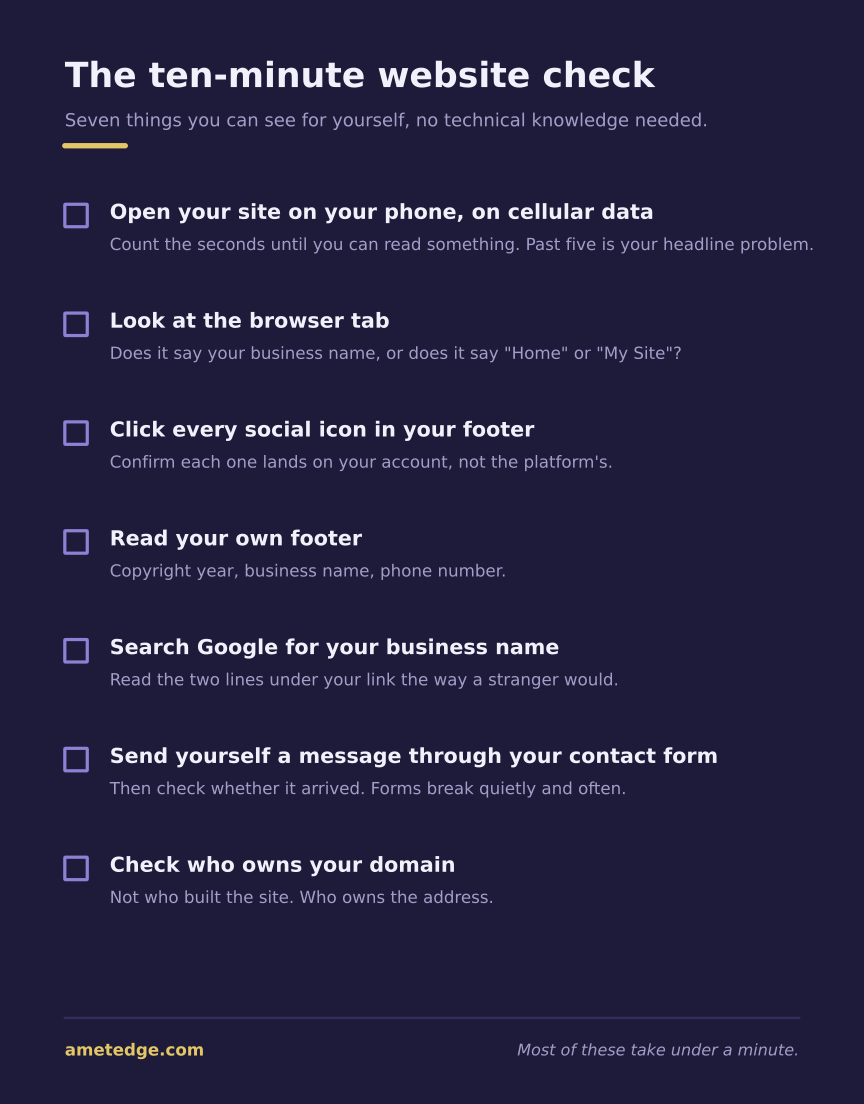
The ten-minute check
Whatever your site cost, run through this. It’s the same list I use when I look at a business for the first time.
- Open your site on your phone, on cellular data, not wifi. Count the seconds until you can read something. If you get past five, that’s your headline problem.
- Look at the browser tab. Does it say your business name, or does it say “Home” or “My Site”?
- Click every social icon in your footer. Confirm each one lands on your account.
- Read your own footer. Copyright year, business name, phone number.
- Search Google for your business name. Read the two lines under your link the way a stranger would.
- Fill in your own contact form and send it. Then check whether the message arrived. Forms break quietly and often.
- Check who owns your domain. Not who built the site. Who owns the address. If you can’t reach whoever set it up, here’s how to get back in.
Most of these take under a minute. Two of the three sites above would have failed items 2 and 3 in about fifteen seconds.
Or I’ll do it for you
If you’d rather have someone else look, send me your address and I’ll run the same audit I ran on the three sites above. You get back two speed scores, a list of what I found, which items you can fix yourself in ten minutes, and which ones need real work.
No cost, and no pitch attached. If the list is short, that’s genuinely good news and you can stop reading here. If it’s long, at least you’ll know what’s on it before you decide who fixes it.
What the next tier up buys you
For context, here’s what my entry package includes, and I’m listing it because “you get more” is a useless sentence without specifics:
- A custom design, not a template: either one long landing page or up to five separate pages
- Responsive layout that holds up on phone, tablet, and desktop
- Business information, services or menu, and hours
- A photo gallery of your actual work
- Google Maps and a tap-to-call button
- A contact form that delivers messages straight to you
- Social links (pointing at your accounts)
- Fast loading
- Technical SEO: page titles and meta descriptions written properly, a sitemap, clean markup, correct mobile rendering. In other words, every specific thing that went wrong on the three sites above. Keyword research and ongoing search work are a separate service, and I’d rather say that than let it sound bundled
That runs roughly $900–$1,500. The full pricing breakdown is here if you want the comparison across every route.
The honest version of the pitch: most of that list is available on a builder too, if you sit down and configure it properly. What you’re paying for is that someone did, and that the leftovers got cleaned up before launch.
Is a cheap website worth it?
Sometimes. A $500 site that someone finished carefully beats a $3,000 site that nobody thought about. The risk is that at $500 there’s rarely enough budget for anyone to go back and check the details, and the details are where these sites fail.
What’s the cheapest way to get a website?
A builder subscription. The entry tiers run $17–$25 a month, plus a weekend of your own time. That’s a real option and I’d rather you knew about it. Just budget a second weekend for the parts the setup wizard doesn’t force you to fill in.
Are website builders bad?
No. Every problem in this article came from how the site was set up. Wix and Squarespace can both produce a perfectly good small business site. The three above just never got finished.
How do I know if my site has these problems?
Run the ten-minute check above. Every item on it is something you can see for yourself, without any technical knowledge and without anyone’s help. If you’d rather not, send me your address and I’ll run the audit and send you the list.
Should I rebuild or fix what I have?
Fix first. Placeholder social links, a missing page title, and an empty meta description are minutes of work, not a rebuild. Rebuild when the site can’t do something your business needs, like taking bookings or updating your own menu.
The checklists, in one PDF. All four one-pagers from this series — is the quote fair, the ten-minute site check, what you actually own, and nine questions before you hire. Open the PDF →
Written by Egor, founder and developer at AmetEdge. I build custom websites for small businesses across the US: restaurants and cafés, auto repair and body shops, contractors and home services, dental and medical clinics, salons and studios, gyms and trainers, and plenty of others. No agency, no upfront payment, and you own everything at the end.