Why Your Website Doesn’t Show Up on Google
By Egor · · 9 min read
“My website doesn’t show up on Google” describes three completely different problems, and they have almost nothing in common except the sentence.
Google might not have your website at all. Or it might have it and rank you on page six. Or your website might be fine and it’s your business that’s missing from the map results. Different causes, different fixes, and confusing them wastes months.
There’s a test that separates them in about a minute. Do that first.

The 60-second test
Go to Google and search for this, with no space after the colon:
site:yourbusiness.comYou’ll get one of three answers.
Results appear. Google has your site. Your problem is ranking, not indexing, and the second half of this article is the relevant half. Note roughly how many pages come back; the number Google shows is approximate, but it tells you whether it’s your whole site or a few pages.
Nothing appears. Google doesn’t have your site indexed at all. That’s the first half of this article, and it’s usually fixable in a day.
Some pages appear but not the ones you expected. Partial indexing, which is the most common of the three and the most misdiagnosed.
Now search your business name on its own, the way a customer would. If your website comes up but there’s no map listing next to it, that’s the third problem, and it lives in Google Business Profile rather than on your website at all.
If Google doesn’t have your site
Five reasons, in the order I’d check them.
1. It’s too new. Published guides put indexing for a new site somewhere between four days and four weeks, and Google publishes no promise at all. Google’s own position is that indexing is never guaranteed, even for good pages. If your site went live last week, you may simply be early.
2. Google doesn’t know it exists. A sitemap is a file listing your pages, and submitting it in Google Search Console is how you tell Google to come and look. Without it, Google has to stumble across you through a link from somewhere else, which on a brand new site may be nowhere.
3. A noindex tag is still on the page. This is a line of code that tells Google explicitly not to index a page. It’s standard on staging sites, and it’s one of the most common launch mistakes: the site goes live and the tag comes with it. The site looks perfect to visitors and is invisible to Google.
4. robots.txt is blocking the crawler. Same idea, different file. It sits at yourbusiness.com/robots.txt and you can open it in a browser right now. A line reading Disallow: / blocks your entire site.
5. Crawled, but not indexed. Google came, looked, and decided not to include the page. This usually means thin content, near-duplicate pages, or a page with nothing on it that couldn’t be found elsewhere. Painful to hear, and the fix is the page, not the settings.
What “not indexed” usually looks like
Here’s the part most articles on this subject skip: a not-indexed count is not automatically a problem.
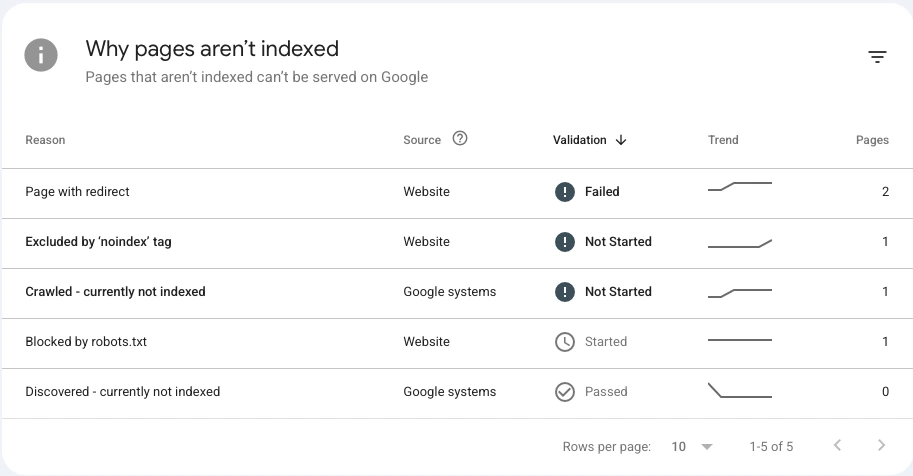
My own site is about a month old. Search Console currently shows 11 pages indexed and 5 not indexed across four reasons. On the face of it that sounds like a third of the site is broken. It isn’t. Here’s what the five are, using Search Console’s own wording so you can match them against your report:
| Reason | Pages | What it actually is |
|---|---|---|
| Page with redirect | 2 | The www and http versions of my address, both pointing at the canonical one. Working as intended. |
| Excluded by ‘noindex’ tag | 1 | A page I deliberately keep out of search. |
| Crawled - currently not indexed | 1 | Still in the queue. |
| Blocked by robots.txt | 1 | An API endpoint, not a page anyone would visit. |
Four of the five are correct behaviour and one is a waiting room. Nothing here needs fixing.
Those first two are worth pointing at, because almost everyone has them. If your site is reachable at both www.yourbusiness.com and yourbusiness.com, and over both http and https, that’s four addresses for one site. The redirects that send them all to a single canonical version are exactly what you want, and Search Console lists them here as “not indexed” because technically they aren’t. Nothing is wrong.
One more oddity worth explaining: my sitemap lists 10 pages, but 11 are indexed. The extra one is a page I chose to keep out of the sitemap but didn’t block from search, and Google found it anyway by following a link in my footer. That’s the mechanic in a sentence — a sitemap is an invitation, not a complete list. Google indexes what it can reach, whether or not you pointed at it.
So the question isn’t “are any pages not indexed.” It’s “are the right pages indexed.” Open your Pages report, read the reasons, and check them against what you meant to happen. A redirect showing up here is fine. Your services page showing up here is not.
The one reason worth acting on immediately is a noindex tag on a page you want people to find. That’s the launch mistake I mentioned, and it’s a two-minute fix once you know it’s there.
How long it should actually take
I can tell you exactly what happened on one site, mine, because I have the dates.
The domain is about a month old. I submitted a sitemap through Search Console on August 5th. Indexing was flat before that and started climbing within days: by mid-August, eleven pages were in the index. The sitemap itself was last processed on August 24th and reports ten pages found.
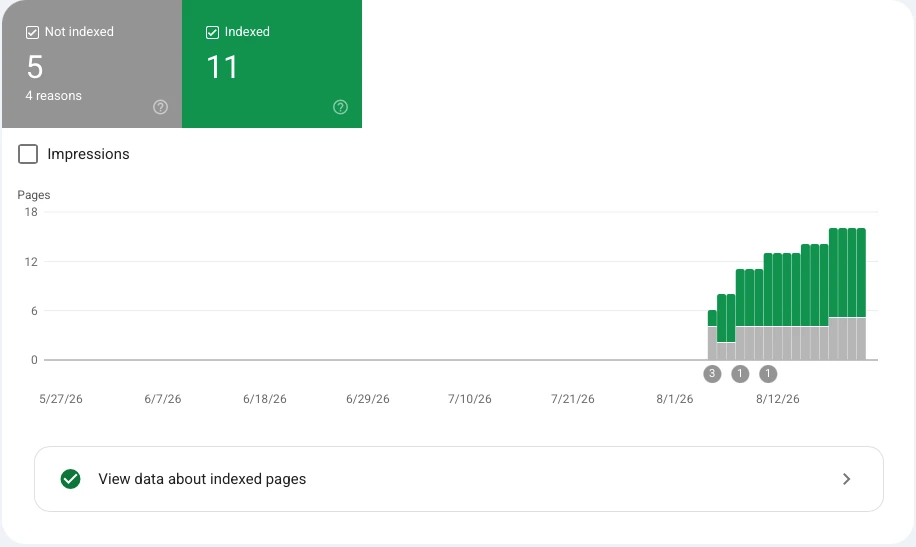
Two honest caveats. One site is not evidence, and this is a small, clean, custom-built site whose owner submitted a sitemap on day one — roughly the best case. A large site, a builder-generated site, or one where nobody submitted anything will be slower.
But it’s a useful counterweight to the common advice that new sites take months to appear. Indexing is often fast. Ranking is what takes months, and those two get conflated constantly.
Which brings us to the second problem.
If Google has your site but nobody finds it
This is the more common situation, and it feels identical from the outside. You’re in the index. You’re just not on page one.
Check what you’re actually searching for. Search your exact business name. If you come up first, you’re indexed and ranking fine for your own name, which is the baseline. If you’re searching something like “web design” and expecting to appear, that’s a different ask entirely — you’re competing with everyone.
Your page titles may be working against you. The title is the blue link text in search results, and it’s the strongest signal on the page about what it’s for. In an audit I did of three small business sites, one auto repair shop’s homepage title still read “HOME | My Site 6” — the default name the builder assigns. Google had indexed it perfectly. It was just listed under a name nobody would ever search. The full teardown of those three sites is here.
You may have no page for the thing you want to rank for. If you want to appear for “brake repair,” there has to be a page about brake repair. One “Services” page listing eight services rarely ranks for any of them.
Ranking takes months, not days. Every credible estimate for a competitive term lands somewhere between three and six months of consistent work, and there’s no version of this that happens in a fortnight.
If it’s your business, not your website
Search your business name. If your website appears but there’s no panel on the right with your hours, phone number, and map pin, your website is not the problem.
That panel comes from Google Business Profile, a free listing that’s separate from your website entirely. For a small business it often matters more than the site: someone searching “mechanic near me” sees a map with three listings before they see any blue links.
You can have a perfect, fast, fully indexed website and be completely absent from map results, because those are two different systems. That listing gets its own article here.
And there’s now a newer place to be missing from: when someone asks an assistant like ChatGPT to recommend a business, getting found runs on related but different rules.
What to do this week
In order, and most of it takes under an hour.
- Run the
site:test and decide which of the three problems you have. - Set up Google Search Console if you don’t have it. It’s free, it takes fifteen minutes, and without it you’re guessing. It’s also the only place Google tells you directly why a page isn’t indexed.
- Submit a sitemap. Usually it lives at
yourbusiness.com/sitemap.xml. Paste that into the Sitemaps section. - Open your
robots.txtin a browser and check forDisallow: /. - Check your homepage title. Look at the browser tab. If it says “Home” or something your builder chose, fix that before anything else.
- Read the Pages report and check each not-indexed reason against what you intended.
- Then wait. Two to four weeks before concluding anything is wrong. Resubmitting a sitemap daily doesn’t speed anything up.
Why is my website not on Google after a month?
Check whether it’s indexed at all using the site: test. If it is, you’re looking at a ranking problem rather than an indexing one, and that timeline is months not weeks. If it isn’t, the usual causes are a missing sitemap, a leftover noindex tag, or a robots.txt block, all of which are quick fixes.
My Wix site isn’t showing up on Google. Is that the platform’s fault?
Rarely. Wix, Squarespace and similar platforms all publish sitemaps and index fine. What does happen on builders is that setup steps get skipped — most often the page title is left as the template default, so the site is indexed but listed under a name nobody searches. Check your browser tab first.
My competitor shows up first. How do I overtake them?
Look at what they have that you don’t, and be specific about it: separate pages for each service, a filled-in Google Business Profile, reviews, and content that answers questions customers actually ask. Then accept that this is a months-long project. Anyone promising page one in a fortnight is selling something.
How do I know if a page is blocked from indexing?
Google Search Console’s Pages report names the reason for each excluded page. Outside of Search Console, you can open yourbusiness.com/robots.txt in a browser, and you can view a page’s source and search it for the word “noindex”.
Should I pay for a service that submits my site to search engines?
No. Submitting a sitemap in Search Console is free and takes two minutes, and it’s the same thing those services do. Google doesn’t accept payment for indexing.
Written by Egor, founder and developer at AmetEdge. I build custom websites for small businesses across the US: restaurants and cafés, auto repair and body shops, contractors and home services, dental and medical clinics, salons and studios, gyms and trainers, and plenty of others. No agency, no upfront payment, and you own everything at the end.